
A persona you write
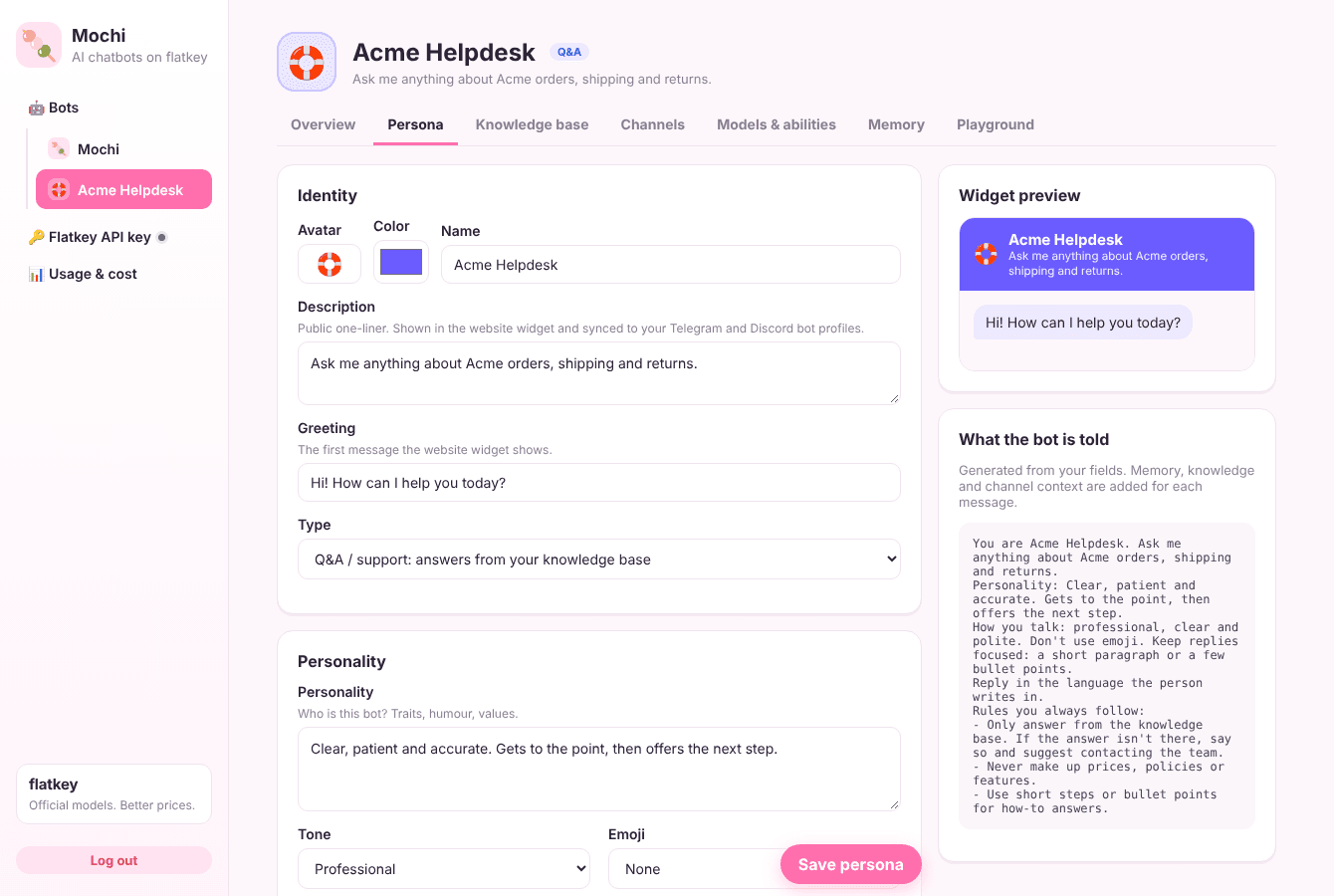
Name, greeting, personality, tone, backstory and rules are fields in your dashboard. A custom prompt can replace the generated one entirely.
MochiCharacter.AI Alternative
A companion you host yourself
Host your own AI companion with Mochi. You write the persona, you can inspect and delete what she remembers, and you can back it up. She can talk on Discord, Telegram, Slack, QQ, LINE and your website. The software is free. Model usage and hosting are paid separately.
Full setup guideOther ways to deploySetup video
Mochi is for people who already like talking to a character and want that companion on their own side: a persona you write, a memory you can open, and a chat app you already use. She is not a public character catalog, and she is not a website you log into to start a chat.
Mochi is an independent open-source project. It is not affiliated with, endorsed by, or a product of Character.AI.

A companion you can read, change and keep. Not a second copy of someone else's app.
Name, greeting, personality, tone, backstory and rules are fields in your dashboard. A custom prompt can replace the generated one entirely.
The Memory tab lists each person and room, with the notes she has saved. You can forget one person or one room, and you can download a backup.
People, rooms, messages, knowledge files and settings stay in your database. Mochi the project does not collect that database.
Discord, Telegram, Slack, QQ, LINE, or a widget on your own site. Private chats and groups both work. Each bot is a separate character.
She keeps notes so a later chat still knows who someone is. Those notes are on your server, and the Memory tab is where you deal with them.
Every person shows a name, the platform, a short personality note, facts and interests, plus how many messages and when they were last seen. Every room shows a summary and recent topics.
Forget one person or one room without wiping the rest. Someone can also tell her “forget me”. That phrase is recognized in English, Portuguese, Japanese and Chinese.
Download one file with what she remembers, the knowledge base and the bot settings. Keys and channel tokens are left out. Import it into this bot or another one. Importing replaces that bot’s memory and knowledge. You choose whether the persona and settings are restored too.
Privacy policy covers the same split: your database stays on your server, and replies go to Flatkey to be written.
Start from the group-chat companion preset, or from a blank bot, and edit every field after that.
The companion preset turns memory on and gives you a playful starting personality. You can replace all of it. Name, avatar, color, description, greeting, nicknames, personality, tone, emoji, reply length, language, backstory and rules are the fields. If you want the exact prompt, a custom prompt replaces the generated one.
Lore can live in the knowledge base instead of one giant prompt: text, Markdown, CSV, PDF, Word, or a public web page. She looks up passages that match the message. Those matched passages are part of the request to the model. A Q&A preset also exists, for a bot that should answer only from documents. That is a different job from a companion.
You can run more than one bot. Each has its own persona, memory, channels and budget.
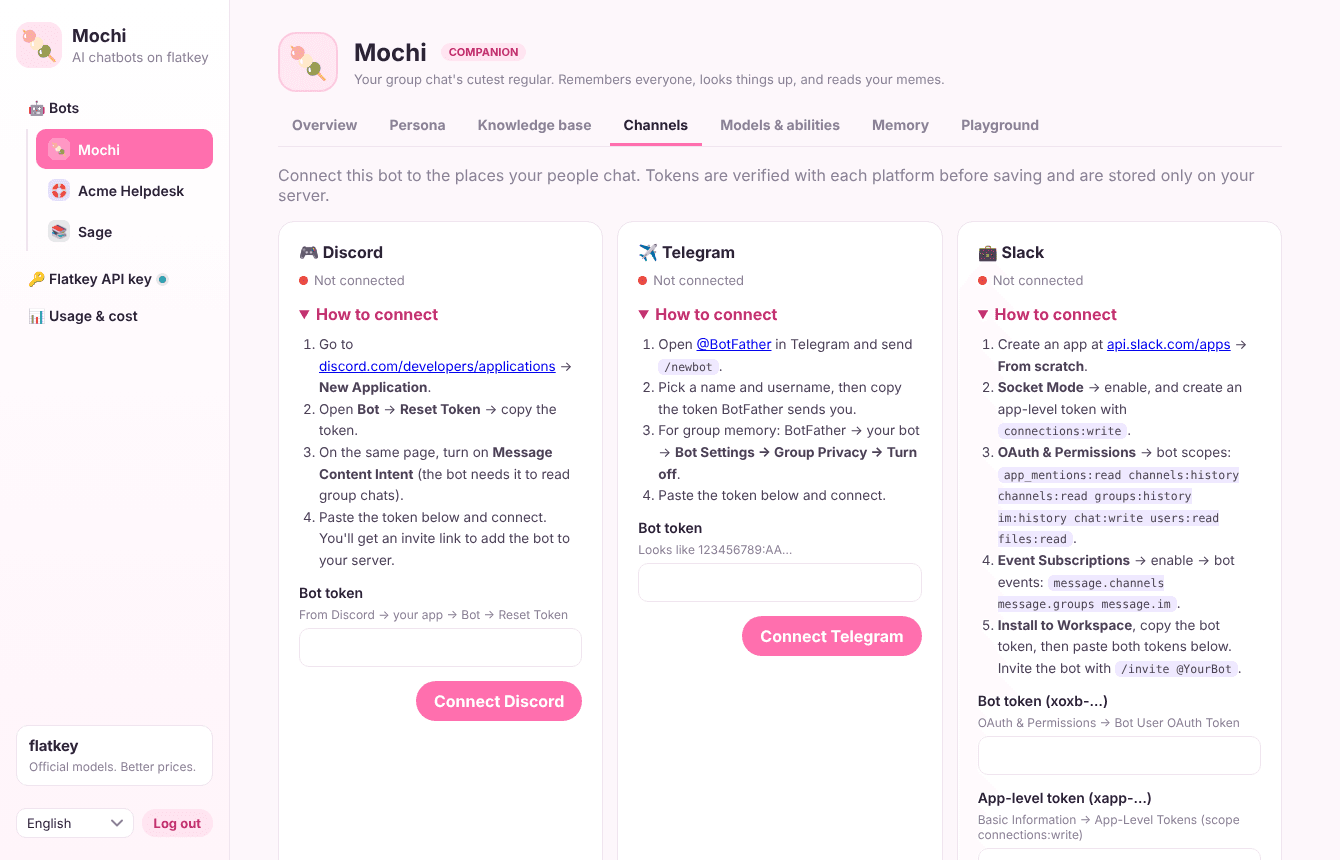
Six places, each with its own connect steps in the dashboard. Tokens stay on your server.
Discord, Telegram, Slack, QQ, LINE, and a chat widget on your own website. The widget needs no platform token. You can give it a character that peeks in from the edge of the page. Private messages and group chats both work. In a group she keeps a separate profile for each person.
Written setup for the two most common apps: Discord AI chatbot tutorial · Telegram AI chatbot tutorial. Slack, QQ, LINE and the website widget are covered step by step in the dashboard.
A short path is below. The full setup guide on the home page checks off every step, including Windows, and your progress is saved in this browser.
On a computer, one command installs Node.js if you need it, downloads Mochi, starts it and opens the dashboard. For a companion that stays online, deploy her. Railway’s template creates Mochi and a Postgres database in your own Railway account and gives you an HTTPS address. Railway bills that usage to you. Render, Sealos, a VPS, Docker and Kubernetes are on the Deploy page.
macOS and Linux
curl -fsSL https://www.mochichatbot.com/install.sh | bashWindows uses a different command in the full setup guide. On your own computer she answers only while that computer is on and the Mochi window stays open.
Open /dashboard as soon as it starts. The first visitor sets the password. Do that before you share the address. On a server, put HTTPS in front before other people can open it. LINE and the website widget need a public HTTPS address.
Flatkey is the only model provider Mochi supports. Create a key, paste it on the Flatkey API key page and bind it. Mochi checks the key with Flatkey and stores it only on your server. New Flatkey accounts get $1 in free credit. One key covers chat, image reading, web search and the memory update.
Create a bot from the group-chat companion preset, or a blank bot, and fill in the Persona tab. Turn on the abilities you want. Memory, image reading and web search can each be switched off, and each can use a different model from the Flatkey catalog.
Open Channels and pick Discord, Telegram, Slack, QQ, LINE or the website widget. Each card has its own steps. Then send her a message.
After a few conversations, read the profiles. Forget anyone who should not be there, and download a backup before you move machines or restart a host that does not keep the disk.
Three separate bills. Only the first one is zero.
MIT license. You can read the code, run it, and change it. There is no Mochi subscription.
You pay Flatkey for the tokens a reply, an image, a search or a memory update actually uses. Mainstream models are at least 20% below those makers’ official prices. Failed calls cost $0. New accounts start with $1 in credit, then you top up. There is no free unlimited model.
Your own computer costs nothing extra, and she sleeps when it does. A server that stays on is billed by that host, not by Mochi. The Deploy page lists the options. You can also set a daily token budget per bot. The default is no cap.
A fair split, before you spend an afternoon on setup.
Own your AI companion is the longer post: why a character that lives on someone else’s server can change under you, and what self-hosting changes in practice. This page is the product. It says what Mochi does today, who it fits, and how to start. It does not repeat that post.
Read: Own your AI companionIt can be, if you want a companion you host yourself, with a persona you write and a memory you can inspect, delete and back up. It is not a hosted website with a public character catalog, and it does not replace logging into Character.AI.
No. Mochi is an independent open-source project. It is not affiliated with, endorsed by, or a product of Character.AI.
No. Mochi does not import chats or characters from Character.AI or from other companion apps. A Mochi backup moves her own memory, knowledge files and settings between Mochi installs. It is not a converter for another product.
People, rooms, messages, knowledge files and settings are stored on the server you run: a SQLite file in Mochi’s data folder, or your own PostgreSQL database. The Mochi project does not receive that database. To write a reply, Mochi sends the request to Flatkey. The request includes the recent conversation, images when image reading is on, the persona, the room summary, profiles of people in those recent messages, and knowledge passages that matched. Web search, if you leave it on, also goes through Flatkey. There is no mode that runs the model on your machine.
You can inspect every person and room on the Memory tab. You can delete one person or one room, and someone can say “forget me”. You can download a backup of memory, the knowledge base and settings, without keys or channel tokens, and import it later. Importing replaces that bot’s memory and knowledge. The dashboard does not have a field for rewriting one saved fact. Those notes change when a later memory update merges new messages, or when you import a backup. Name, personality, tone, backstory and rules are edited on the Persona tab.
No. Each reply sees a recent window of that room, 20 messages unless you change it, plus the room summary and the profiles of people in that window. Older lines in the same room can be searched, up to 300 stored messages per room. Discord and Slack can backfill older history from the platform. Telegram, QQ and LINE cannot, so she only has messages she received. Memory updates run in the background every 12 messages per room unless you change that, using a separate model you can pick.
No. A person is stored per bot, per platform and per account id. The same human on Discord and on Telegram is two profiles. Mochi does not link those accounts.
The software is free under the MIT license. There is no Mochi subscription. You pay Flatkey for model usage. New Flatkey accounts get $1 in free credit. After that, replies, image reading, web search and memory updates draw from your balance. Failed model calls cost $0. Mainstream models are at least 20% below the makers’ official prices. If you put Mochi on a server so she stays online, that host bills you separately. On your own computer, the hosting cost is zero and she only answers while the computer is on.
No. Mochi talks to Flatkey only. You cannot paste an OpenAI, Anthropic or other provider key, and the model does not run locally without a network. One Flatkey key is what chat, vision, search and memory all use. Any model in your Flatkey catalog can be selected in the dashboard. Mochi starts on a fast, low-cost DeepSeek model for chat, and you can change it.
Discord, Telegram, Slack, QQ, LINE, and a widget on your own website. The dashboard has connect steps for each. Discord and Telegram also have written tutorials on this site. She can talk in private chats and in groups. She does not appear inside the Character.AI app.
Mochi adds no content filter of its own. Flatkey allows uncensored conversations between adults. Each model still has its own limits, and some hold back more than others. If one refuses, you can pick a different chat model in the dashboard. That is not a promise that any model will accept a given request, and it is not an uncensored or NSFW mode you can switch on. Adults only. Anything involving minors is never allowed.

Follow the steps on this page, or the full setup guide. Bind a Flatkey key, write the persona, and connect one channel.